GST & non-GST bills
Choose no new GST, a whole-bill rate or product rates. Review the tax split and totals before saving.
Bills, stock and customers, together on your Android phone. Built to keep everyday billing working offline.
A tentative target, subject to phone, printer, sync and backup testing. We may move the date if fixes need more time. This is not a confirmed wide public launch.
See what still needs testing ↓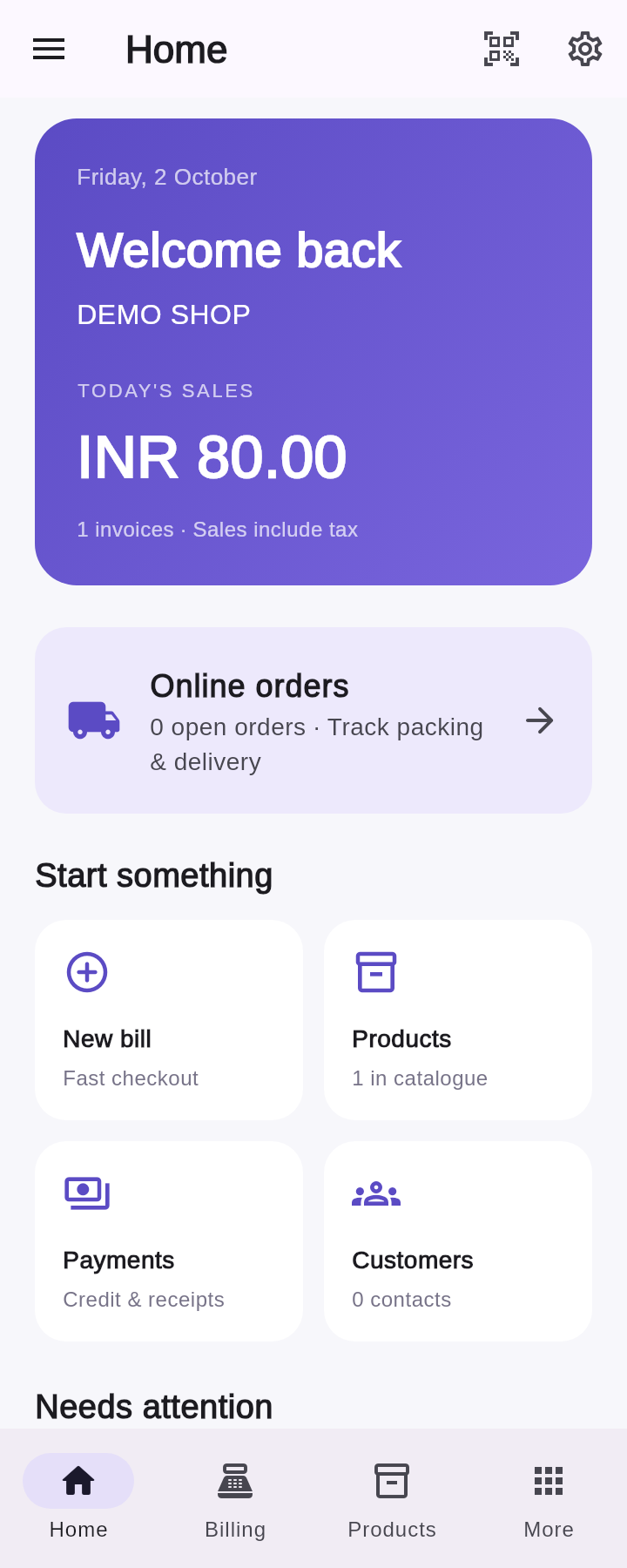
Wi-Fi printing, Bluetooth printing, volume-key shortcuts and the in-app popup have been confirmed in the developer's own device tests. The popup appeared with a short delay.
USB OTG remains untested. These results apply to the tested setup, not every phone or printer. Wider compatibility and shop-use checks are still ongoing.
Follow billing, khata, stock and daily closing with a step-by-step shop demo.
See the shop workflow, step by step.
▶ Watch English demo हिन्दी · HindiExplore the same shop workflow in Hindi.
▶ Watch Hindi demo ಕನ್ನಡ · KannadaExplore the same shop workflow in Kannada.
▶ Watch Kannada demoVideos open on YouTube. These demos use synthetic screens and sample records, not recordings of live camera scanning, printing, payments or cloud sync.
Use the app UI in English, Kannada or Hindi. Switch from the login screen or Settings. Bills, receipts and PDFs stay in English. Regional wording is still being checked.
From the first bill to daily closing. Explore the tools in the Android app, with honest notes about what still needs testing.
32 features
Choose no new GST, a whole-bill rate or product rates. Review the tax split and totals before saving.
Enter cash received and see what to return. Only the bill amount is recorded as payment.
Keep invoice references, due dates, delivery details and notes. Review saved bills and reprint when needed.
Track outstanding amounts and payments. Open a saved customer's Khata from billing; debt is recorded only after bill review and save.
Saved printer profiles, 58mm and 80mm layouts, and a bounded background queue. Unknown output pauses for a paper check; no automatic retry. Wi-Fi and Bluetooth printing worked in real-device tests on the developer's phone and printers. USB OTG remains untested; compatibility with other phones and printers is not guaranteed.
Display the unpaid amount and shop UPI QR. This is not payment confirmation. The shopkeeper checks their bank or UPI app before recording payment.
Manage a saved catalogue, product details and stock levels. Low-stock warnings help you see what needs attention.
Find saved products by barcode, with optional online lookup. Optional sensor-based Auto light has a manual fallback. Camera and sensor tests remain ongoing; torn-barcode recovery is not included.
Create internal barcodes, shelf labels, photo stickers and batch/date labels. Your shop name belongs on your labels.
Record incoming purchases and supplier dues alongside your stock records.
Work through a margin calculation or prepare a restock worksheet from the Advanced section.
Keep walk-in, online and nearby-household customers organised, with saved contact and billing records.
Set earning and redemption rules. New points are earned after full payment, and balances appear on receipts.
Keep an order queue and tracking details. Marketplace names are labels, not connected marketplace accounts.
Prepare a tracking message for WhatsApp. The shopkeeper reviews it and taps Send; the app does not auto-message customers.
Record returns and refunds alongside the shop's sales history.
Keep expenses together and review the day's shop activity before closing.
Explore sales charts for 7, 30 or 90 days. Figures reflect the records entered into the app.
Export and restore JSON backups, with reminders to keep a separate copy. Store backups somewhere safe.
Optional PIN and biometric lock, plus an owner recovery key saved during setup. Keep that key safe; device compatibility still needs checking.
Email sign-in and password-reset flows are included in the test app. Validate them on the phones used for the pilot.
Online shop sync is coded with login/resume/save updates, cached records and pending-change/error review. Two-device, offline reconnect and accounting validation remain ongoing.
Optional app-usage sharing and owner push announcements start off. Controls explain Firebase data use; billing and customer records are not sent as usage events.
Product, privacy, terms and FunMakerz information in one place, with company support contacts.
Firebase push and a short foreground message are coded, with a separate device opt-in starting off. Push is not the in-app popup feature. Delivery and delay testing are still ongoing.
Change the app language from the login screen or Settings. Bills, receipts and PDFs remain in English. Native-language wording review is ongoing.
The Billing scanner is designed to add saved products straight to the cart. Review quantities and totals before saving; camera and wider device tests remain open.
Take a photo of a printed bill, review the text and match products before saving. Rotate, adjust contrast and correct names. Handwriting is not reliably supported.
See most-sold products and pending khata from saved shop records. Runs on local rules and calculations, not cloud AI. It does not order stock or message customers.
Prepare a customer khata statement, preview it and choose to send it yourself. No automatic messages or collection.
Pair a second phone or laptop to show bill items, the total and UPI QR. Payment status changes only when the cashier confirms it. Encrypted display is coded; final real-device pairing and full-screen checks remain open.
Set up your shop name, phone, address, invoice prefix and UPI details. You can choose to finish setup later.
GST rates, registration, place of supply and business records must be checked by the shopkeeper. This is not certified GST or e-invoice software. Wi-Fi and Bluetooth printer output has been confirmed on the developer's test setup. USB OTG and wider printer compatibility remain unverified. Offline reconnect testing is still ongoing.
Actual Flutter app-widget renders, using synthetic demo data. These are local previews, not screenshots from tested phones.
View the daily summary and open billing, products, payments or customers from Home.
Local widget previews, not phone-tested screenshots. Home and sign-in show the current active app UI. The scanner is camera-off; About shows an earlier 3.3.1 render, and device choices include an in-progress popup switch.
The pilot target is 14 October 2026. The results below separate confirmed device checks from work still open; code completion is separate from reliable shop use.
The optional in-app popup appeared on the developer's phone in 3.3.4, with a short delay. This is separate from push notifications; push delivery testing remains ongoing.
Wi-Fi and Bluetooth printing passed on the developer's phone and printers. USB OTG is untested. Camera, ambient light, PIN/biometrics and wider phone/printer checks remain open. No universal support promise.
Reconcile two-device bills, stock and customer balances. Exercise offline reconnect and conflicting edits without missing or duplicate records.
Check full export/restore and real-record migration on devices before shop use. Keep a separate backup; synthetic checks are not enough.
Confirm production app identity, secure release signing and distribution. Current About Test APKs are ARM64 debug-signed previews, not a public release candidate.
Configurable volume-key shortcuts worked on the developer's phone in 3.3.4. Set them in Settings > Volume-key shortcuts, then use short presses on Billing. Torn-barcode training/recovery is still not implemented.
Search your saved catalogue or look up a barcode. Online lookup is optional.
Build the cart, review the customer and totals, then record the payment.
Review the day's work and export a backup. Your records stay on your device.
UPI stays in your hands. The shopkeeper confirms that the payment arrived. A QR scan is not automatic payment verification.
Yes. Later test builds include English, Kannada and Hindi app UI. Switch from the login screen or Settings. Bills, receipts and PDFs stay in English; regional wording review is ongoing.
Everyday billing and saved shop records work offline. Optional online barcode lookup needs an internet connection.
Local records are stored on the phone. Optional signed-in shop sync is coded in the test app; two-device and offline validation are ongoing. Export a backup separately. Firebase usage and announcement choices start off.
The initial small-shop pilot target is 14 October 2026, subject to testing and possible delay. A public APK or store download is not offered here yet. Current private test builds are not production release candidates.
The test app includes 58mm and 80mm layouts and saved printer profiles. Wi-Fi and Bluetooth printing worked on the developer's phone and printers. USB OTG is untested. This does not confirm every printer model or both paper widths on every device. Test your own printer before relying on it at your counter.
No. The shopkeeper confirms the payment after checking that it arrived. Scanning a QR does not automatically verify a payment.
Pricing and the release policy are still to be confirmed. This preview makes no pricing promise.
Initial small-shop pilot target: 14 October 2026. Subject to testing; the date may move. Public download and wider release are not confirmed.